
Appearance
Authentication
All protected endpoints require two request headers:
| Header | Description |
|---|---|
X-API-KEY | Your account's permanent API key |
X-SIGNATURE | A per-request signature derived from the request body |
The API key and API secret are obtained from the Profile tab in the TradeAtlas portal. The secret is never sent as a header — it is used only to compute
X-SIGNATURE.
1. Getting your API Key and Secret
You can obtain your API key and secret from the Profile tab in the TradeAtlas portal. Both are permanent values; store the secret securely and never expose it on the client side (browser, mobile app).
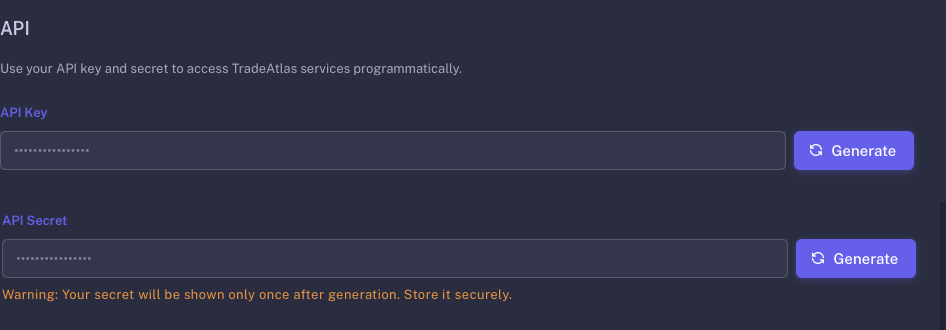
In the TradeAtlas portal, open the API tab from the top menu. Generate your API Key and API Secret here using the Generate button. The secret is shown only once — store it securely.
2. X-API-KEY
Your API key is generated once from the Profile tab in the TradeAtlas portal. It is a permanent value — the same key is used for every request.
X-API-KEY: your-api-key3. X-SIGNATURE
The signature is request-specific and must be recomputed for every request. It is the Base64-encoded HMAC-SHA256 of the request payload, signed with your API secret.
signature = Base64( HMACSHA256( requestPayload, apiSecret ) )requestPayload— the raw JSON string sent as the request body. For requests with no body (e.g., GET), use an empty string"".apiSecret— the value from the Profile tab in the TradeAtlas portal.
IMPORTANT
The signature must be computed over the exact same body you send. If you re-serialize the JSON after signing (changing whitespace or field order) or send a different body, the signature becomes invalid and you will receive a 401.
Computing the signature
js
import crypto from 'crypto'

const payload = '{"page":1,"search_type":"importer"}'
const apiSecret = 'your-api-secret'

const signature = crypto
  .createHmac('sha256', apiSecret)
  .update(payload)
  .digest('base64')
bash
PAYLOAD='{"page":1,"search_type":"importer"}'

SIGNATURE=$(echo -n "$PAYLOAD" \
  | openssl dgst -sha256 -hmac "your-api-secret" -binary \
  | base64)
java
import javax.crypto.Mac;
import javax.crypto.spec.SecretKeySpec;
import java.util.Base64;
import java.nio.charset.StandardCharsets;

String payload   = "{\"page\":1,\"search_type\":\"importer\"}";
String apiSecret = "your-api-secret";

Mac mac = Mac.getInstance("HmacSHA256");
mac.init(new SecretKeySpec(apiSecret.getBytes(StandardCharsets.UTF_8), "HmacSHA256"));
byte[] hash = mac.doFinal(payload.getBytes(StandardCharsets.UTF_8));
String signature = Base64.getEncoder().encodeToString(hash);
python
import hmac, hashlib, base64

payload    = '{"page":1,"search_type":"importer"}'
api_secret = "your-api-secret"

signature = base64.b64encode(
    hmac.new(api_secret.encode(), payload.encode(), hashlib.sha256).digest()
).decode()
4. Full Request Example
The examples below sign the payload and send it with the X-API-KEY and X-SIGNATURE headers.
js
import crypto from 'crypto'

const payload = JSON.stringify({
  page: 1,
  search_type: 'importer',
  importer_countries: ['US'],
  hs_codes: ['847130']
})

const signature = crypto
  .createHmac('sha256', 'your-api-secret')
  .update(payload)
  .digest('base64')

const res = await fetch('https://apiv2.tradeatlas.com/api/v1/firms/search', {
  method: 'POST',
  headers: {
    'Content-Type': 'application/json',
    'X-API-KEY': 'your-api-key',
    'X-SIGNATURE': signature
  },
  body: payload
})

const data = await res.json()
bash
PAYLOAD='{"page":1,"search_type":"importer","importer_countries":["US"],"hs_codes":["847130"]}'

SIGNATURE=$(echo -n "$PAYLOAD" \
  | openssl dgst -sha256 -hmac "your-api-secret" -binary \
  | base64)

curl -X POST https://apiv2.tradeatlas.com/api/v1/firms/search \
  -H "Content-Type: application/json" \
  -H "X-API-KEY: your-api-key" \
  -H "X-SIGNATURE: $SIGNATURE" \
  -d "$PAYLOAD"
java
import javax.crypto.Mac;
import javax.crypto.spec.SecretKeySpec;
import java.net.URI;
import java.net.http.HttpClient;
import java.net.http.HttpRequest;
import java.net.http.HttpResponse;
import java.nio.charset.StandardCharsets;
import java.util.Base64;

String payload = "{\"page\":1,\"search_type\":\"importer\",\"importer_countries\":[\"US\"],\"hs_codes\":[\"847130\"]}";

Mac mac = Mac.getInstance("HmacSHA256");
mac.init(new SecretKeySpec("your-api-secret".getBytes(StandardCharsets.UTF_8), "HmacSHA256"));
String signature = Base64.getEncoder()
    .encodeToString(mac.doFinal(payload.getBytes(StandardCharsets.UTF_8)));

HttpRequest request = HttpRequest.newBuilder()
    .uri(URI.create("https://apiv2.tradeatlas.com/api/v1/firms/search"))
    .header("Content-Type", "application/json")
    .header("X-API-KEY", "your-api-key")
    .header("X-SIGNATURE", signature)
    .POST(HttpRequest.BodyPublishers.ofString(payload))
    .build();

HttpResponse<String> response = HttpClient.newHttpClient()
    .send(request, HttpResponse.BodyHandlers.ofString());
python
import hmac, hashlib, base64, requests

payload = '{"page":1,"search_type":"importer","importer_countries":["US"],"hs_codes":["847130"]}'

signature = base64.b64encode(
    hmac.new("your-api-secret".encode(), payload.encode(), hashlib.sha256).digest()
).decode()

response = requests.post(
    "https://apiv2.tradeatlas.com/api/v1/firms/search",
    headers={
        "Content-Type": "application/json",
        "X-API-KEY": "your-api-key",
        "X-SIGNATURE": signature,
    },
    data=payload,
)
data = response.json()
Common Errors
| Status | Likely Cause | Fix |
|---|---|---|
401 Unauthorized | X-API-KEY or X-SIGNATURE missing/invalid | Verify the headers are sent and the key is correct |
401 (signature mismatch) | Signature computed over a different string than the sent body | Compute the signature over the exact body you send; do not re-serialize the JSON |
401 (wrong secret) | Incorrect or expired API secret | Use the current secret from the Profile tab |
For detailed error codes, see the Errors page.